 The Nerdy Tech Blog
Automating TLS Certificates with cert-manager and Gateway API using ACME HTTP01 Challenge
Tue 10 February 2026For my non-production Kubernetes clusters I was bootstrapping my own certificate authority. I am not too happy about that provisioning process as it is not fully automated currently, and you need to add the custom root CA wherever you need access to the cluster's resources. This is cumbersome and time-consuming.
As I also use AWS quite a bit, I noticed that registering certain domains is rather cheap there. With cheap, I mean really cheap like 3$ a year. So I registered a couple domains there which I use for my Kubernetes clusters now. I also like the option to manage all DNS settings for these domains with Route53 using OpenTofu. That way I can fully automate the DNS setup for my Kubernetes clusters before I set up a cluster itself.
So I was looking in cert-manager docs how I could revise the creation of TLS certificates: there are good options to fully automate this with HTTP01 challenge using Ingress or Gateway API. Another nice option would be using the DNS01 challenge with different DNS servers. I saw that I can configure automated TLS certificate generation using the HTTP01 challenge with Kubernetes resources in my cluster without any external dependencies. So I choose to do that in the first place. The disadvantage of using the HTTP01 challenge is that you cannot create wildcard TLS certificates with it.
cert-manager offers the option to configure the HTTP01 challenge using an Ingress solver or a Gateway API solver. As I did switch my clusters to Cilium and Gateway API already I choose to go for the Gateway API solver option. Please be aware that Ingress API is already frozen and the official recommendation is to use Gateway API nowadays. So going for the Ingress solver is not really an option anymore unless you are already using Ingress widely in your cluster and cannot migrate so easily.
HTTP01 Challenge
The HTTP01 challenge with Gateway API works like this:
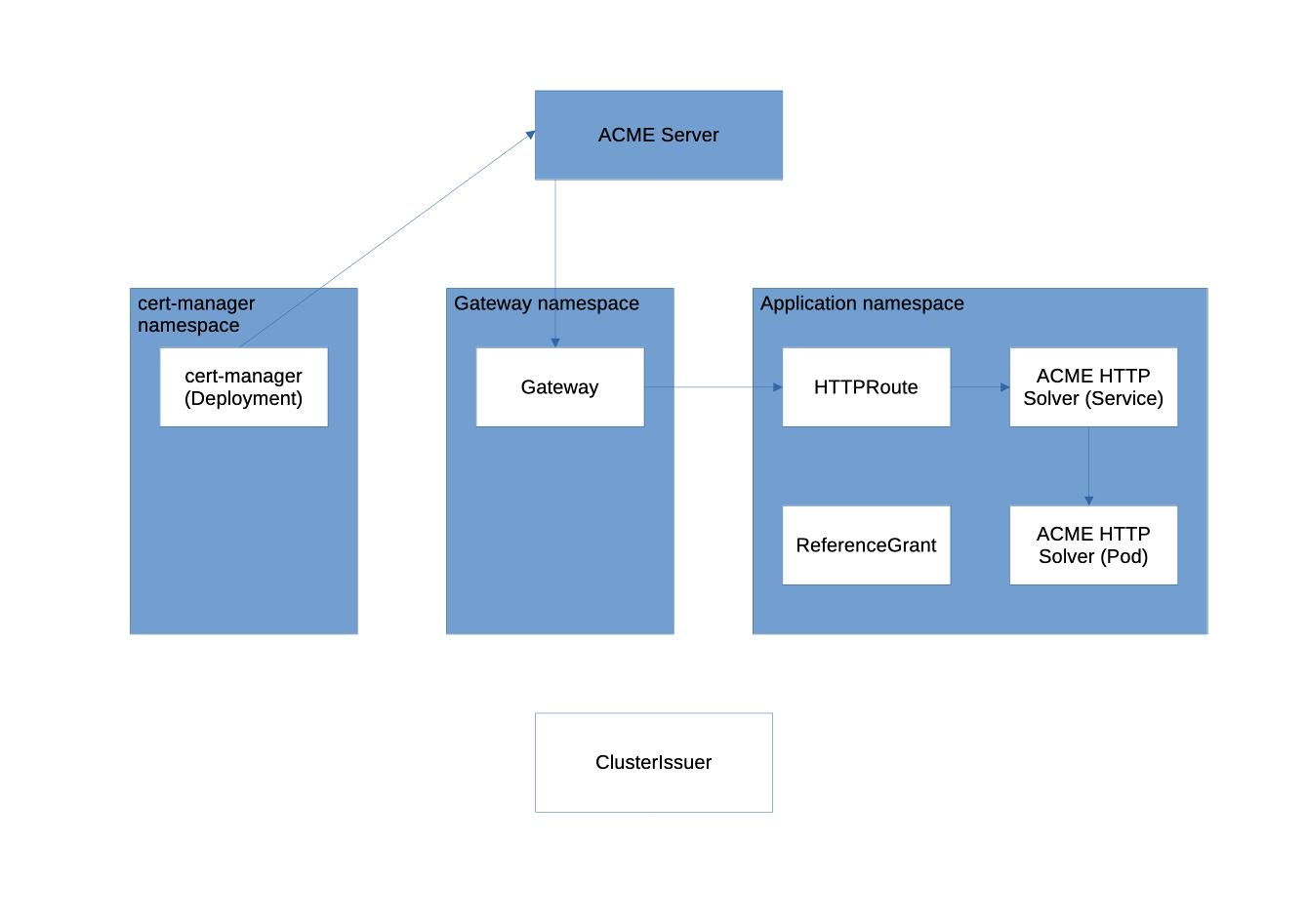
The complete process is as rather complex:
- You create a Certificate resource in your applications namespace requesting a TLS certificate for a domain.
- cert-manager detects the request and creates an ACME Order with the ACME server (e.g. Let’s Encrypt).
- The ACME server returns an HTTP-01 Challenge for the domain.
- cert-manager creates a temporary solver Pod in your applications namespace that can serve the challenge response.
- cert-manager creates a temporary Service pointing to the solver Pod.
- cert-manager creates a temporary HTTPRoute that:
- Matches /.well-known/acme-challenge/*
- Forwards traffic to the solver Service
- Attaches to the configured Gateway
- DNS resolves the domain to the Gateway’s IP, and HTTP traffic reaches the Gateway.
- The Gateway routes the ACME challenge request to the solver Pod via the HTTPRoute.
- The ACME server performs an HTTP GET on the challenge URL and receives the expected response.
- The ACME server validates the challenge and issues the TLS certificate.
- cert-manager retrieves the certificate and stores it in a Kubernetes TLS Secret.
- cert-manager deletes the temporary solver Pod, Service, and HTTPRoute.
- The Gateway references the TLS Secret and starts serving HTTPS with the issued certificate.
Configuration
In contrast, the configuration of the Kubernetes resources for this process is rather simple.
In the first place you need to install cert-manger with Gateway API feature gate enabled. If you use the
official Helm chart just add this to your values.yaml:
extraArgs:
  - "--enable-gateway-api"
As you usually do not allow any non-HTTPS traffic to your cluster, I would consider it as good practice to have a
dedicated Gateway that specifically deals with these ACME
challenges only. The only HTTPRoutes allowed to are the ones for the HTTP01 solver Pod/Service in the application
namespaces. So you need to label your namespaces with tls-certificates: http01 or something else which suits your
needs. This way the Gateway is restricted to the namespaces where it's allowed to create
HTTPRoutes for the ACME HTTP Solver Pods. In these Namespaces
you can put Certificate resources for requesting TLS certificates. So you would configure a Gateway like this:
apiVersion: gateway.networking.k8s.io/v1
kind: Gateway
metadata:
  name: acme
  namespace: network
spec:
  gatewayClassName: cilium
  addresses:
  - type: IPAddress
    value: 192.168.10.96
  listeners:
  - name: http
    protocol: HTTP
    port: 80
    allowedRoutes:
      namespaces:
        from: Selector
        selector:
          matchLabels:
            tls-certificates: http01
For the incoming traffic on port 80 you need to add a route to the specific IP address that you configured for it.
A ClusterIssuer using this Gateway would be configured like this:
apiVersion: cert-manager.io/v1
kind: ClusterIssuer
metadata:
  name: letsencrypt-http01
spec:
  acme:
    server: https://acme-v02.api.letsencrypt.org/directory
    email: your@example.email
    privateKeySecretRef:
      name: letsencrypt-http01-cluster-issuer-account-key
    solvers:
      - http01:
          gatewayHTTPRoute:
            parentRefs:
              - name: acme
                namespace: network
                sectionName: http
                kind: Gateway
Please be aware that you need to create a ReferenceGrant in the application namespace where the Certificate resources are placed if those namespaces differ.
apiVersion: gateway.networking.k8s.io/v1beta1
kind: ReferenceGrant
metadata:
  name: argocd
  namespace: argocd
spec:
  from:
  - group: gateway.networking.k8s.io
    kind: Gateway
    namespace: network
  to:
  - group: ""
    kind: Secret
That's basically all what you need to configure to be able to issue TLS certificates. Which I think is really great.
You could then create TLS certificates by configuring a Certificate resource like this in argocd namespace for
instance. Please be aware that the argocd namespace needs to be labeled with tls-certificates: http01 for a
CertificateRequest to work:
apiVersion: cert-manager.io/v1
kind: Certificate
metadata:
  name: argocd
  namespace: argocd
spec:
  secretName: your-secret-name
  issuerRef:
    name: letsencrypt-http01
    kind: ClusterIssuer
  dnsNames:
  - "argocd.yourdomain.com"
Please be aware that you need to have the DNS resolution for argocd.yourdomain.com configured in the first place. DNS and
routing for incoming network traffic on port 80 need to be configured so that requests for this domain will hit your
Gateway which you configured resolving these ACME challenges.
You can find a full working example in the argocd section
of my turnkey Kubernetes cluster project.